
When you resize an image or video, the width and height need to stay in the right proportion to avoid stretching or squashing the content. This proportion is called the aspect ratio.
For example, an image that is 1920x1080 has an aspect ratio of 16:9. A square image like 1080x1080 has an aspect ratio of 1:1. Aspect ratios are used everywhere, from YouTube videos and social media posts to websites, presentations, and digital displays.
What Is an Aspect Ratio?
An aspect ratio describes the proportional relationship between the width and height of an image, video, or screen. It is written using two numbers separated by a colon.
- 16:9 means 16 units wide for every 9 units tall
- 1:1 means the width and height are equal
- 9:16 means the image is taller than it is wide
- 4:3 means 4 units of width for every 3 units of height
The aspect ratio does not tell you the exact size of an image. It tells you its shape and proportions. For example, all of these have a 16:9 aspect ratio: 1920x1080, 1280x720, 960x540, and 640x360. The dimensions are different but the proportions are the same.
How Do You Calculate Aspect Ratio?
To calculate an aspect ratio, you need the width and height of the image. For example, an image that is 1920x1080 simplifies to 16:9.
You do not have to manually simplify the numbers every time. Our Aspect Ratio Calculator calculates the simplified ratio automatically. Just enter the width and height in pixels and it displays the result instantly.
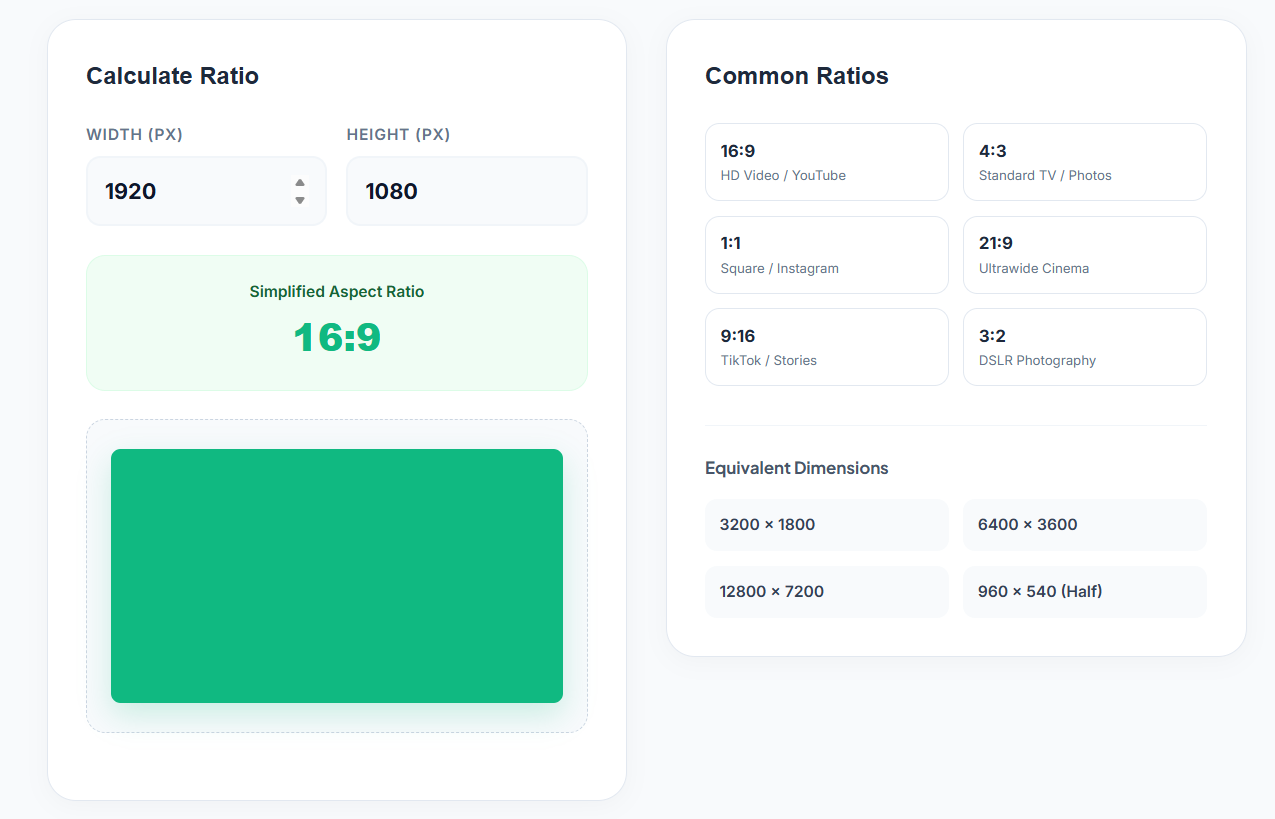
The calculator also provides a visual preview so you can see the shape represented by the calculated ratio.
📐 Need to calculate an aspect ratio? Use our free Aspect Ratio Calculator, enter your width and height and get the result instantly. No signup needed.
What Are the Most Common Aspect Ratios?
Different types of content use different aspect ratios. Here is a quick reference:
| Aspect Ratio | Common Use |
|---|---|
| 16:9 | HD Video, YouTube, presentations |
| 4:3 | Standard TV, some photography |
| 1:1 | Square content, Instagram posts |
| 21:9 | Ultrawide screens, cinema |
| 9:16 | TikTok, Instagram Stories, vertical video |
| 3:2 | DSLR photography |
These are common examples but the correct aspect ratio always depends on the platform, device, or type of content you are creating.
How to Use the Aspect Ratio Calculator
Step 1: Enter the Width
Enter the image or video width in pixels. For example: 1920.
Step 2: Enter the Height
Enter the height. For example: 1080. The calculator automatically uses both dimensions to determine the ratio.
Step 3: Check the Simplified Aspect Ratio
Once you enter both dimensions, the calculator displays the simplified ratio. For 1920x1080 the result is 16:9. You can also see a visual representation of the ratio.
Step 4: Check Equivalent Dimensions
The calculator also displays equivalent dimensions for the calculated ratio. This is useful when you need to create the same shape at a different resolution while keeping the same proportions.
How to Find Equivalent Dimensions
Two images can have completely different dimensions while keeping the same aspect ratio. If your ratio is 16:9, you could use 1920x1080, 1280x720, 960x540, or 640x360. The dimensions change but the shape stays the same.
This is useful when you need to resize content for different platforms without distorting it.
Why Is Aspect Ratio Important?
Using the correct aspect ratio helps your content fit properly into the space where it will be displayed. An incorrect ratio can cause images to look stretched, videos to look squashed, important parts of an image to be cropped, or unwanted empty space to appear around the content.
For example, creating a vertical video in a widescreen format may require cropping when you upload it to a platform designed for vertical content. Knowing the required aspect ratio before creating your content avoids these problems.
Aspect Ratio vs Image Size
Aspect ratio and image size are related but they are not the same thing. Image size refers to the actual pixel dimensions like 1920x1080. Aspect ratio refers to the relationship between those dimensions like 16:9.
Two images can have different pixel dimensions but the same aspect ratio. 1920x1080 and 1280x720 have different sizes but both are 16:9.
Does Changing Image Size Change the Aspect Ratio?
Not necessarily. If you resize an image while keeping its proportions the same, the aspect ratio stays the same. However if you change only one dimension or crop the image differently, the aspect ratio changes.
Frequently Asked Questions
What is an aspect ratio? An aspect ratio is the proportional relationship between the width and height of an image, video, or display.
How do I calculate aspect ratio? Enter the width and height of your image into our Aspect Ratio Calculator. It simplifies the numbers and gives you the ratio instantly.
What is the aspect ratio of 1920x1080? 1920x1080 has a 16:9 aspect ratio.
What is the aspect ratio of a square image? A square image has a 1:1 aspect ratio because its width and height are equal.
What is the most common video aspect ratio? 16:9 is the most common aspect ratio for widescreen video including HD video and YouTube content.
What aspect ratio is used for vertical videos? 9:16 is used for vertical videos, TikTok, and Instagram Stories.
What is the difference between aspect ratio and resolution? Resolution describes the actual pixel dimensions like 1920x1080. Aspect ratio describes the proportional relationship between those dimensions like 16:9.
Can two different image sizes have the same aspect ratio? Yes. 1920x1080 and 1280x720 are different sizes but both have a 16:9 aspect ratio.
What aspect ratio should I use for YouTube? 16:9 is the standard aspect ratio for YouTube videos.
Quick Recap
Aspect ratio describes the relationship between the width and height of an image or video. Common ratios include 16:9 for HD video, 1:1 for square content, 9:16 for vertical video, and 4:3 for standard TV content. Use our Aspect Ratio Calculator to find the ratio of any image by entering its width and height, see equivalent dimensions, and explore common ratios visually.